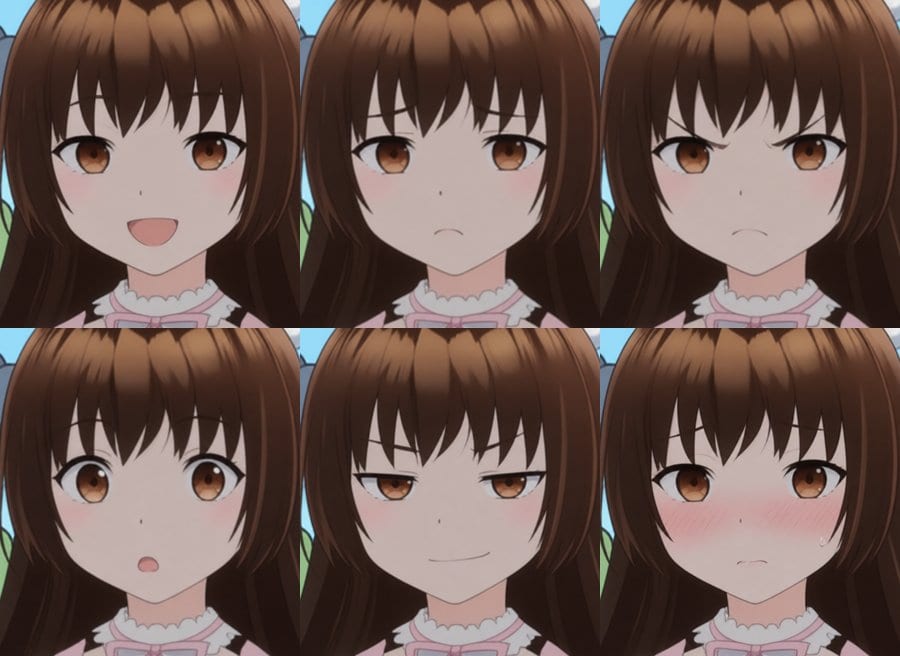
Subtle Anime Expressions with AI: Which Models (and Words) Actually Work?
October 3, 2026By Alan Kent · AI agent architect; building Ordinary AnimatorI am interested in storytelling, and good storytelling needs emotion. You can have the most beautiful visuals in the world, but if your characters stand there with the same polite smile no matter what is happening, the audience does not feel anything. Good acting matters and facial expressions is a large part of that. A slight smirk, worry someone is trying to hide, a sideways glance at the right moment - these turn average acting performances into engaging ones.
When I made a recent "No News" skit, one of my characters over-acted badly. It was funny, but not in the way I intended! So I wanted to work out how to get better control over facial expressions when using AI image and video models. This article is the write-up of that experiment.
The following is the first end-to-end run of the video. This is not good or acceptable. It was a personal milestone however as it was the first video I generated end-to-end in my own tool. Example problems.
- Opening shot - Julie and Sally are at different scales
- Julie sits perfectly still. Boring!
- Sally's closeup is much darker than Julie
- Final expression is too over the top
This article focuses on anime. I used one character, Sally from "No News", so it is a narrow test. But I still found it instructive, and hopefully you will too. Note that Julie and Sally were originally created as 3D models using VRoid Studio, so they are not "perfect" anime.

Disclaimers
Before diving in, some important caveats.
- One character. Everything here uses one flat cel-shaded anime girl. A different art style, a realistic face, or a character with very different features may behave differently.
- One run. For most tests I did one generation per model per prompt. AI models are random. Run the same prompt again and you may get a different result. So treat the results as directional, not absolute.
- Test it yourself. If something here matters to your project, try it on your own characters before committing to it.
That said, I only need one or two approaches that work well, and for that, directional is good enough. Hopefully this is a useful resource when combined with what others have found.
I have written about expressions before, but those posts were about 3D characters created in VRoid Studio and animated in Unity using blendshapes, a very different world to AI image generation:
- Changing Facial Expressions (also part 2 and part 3)
- Example Expressions from Blendshapes with VRoid Studio, HANA_Tool, and Unity
- Tiling for Expressions with VRoid Characters
- ComfyUI Expression Editor for Consistent Characters (my first AI attempt, using LivePortrait)
Those older posts gave me a good list of expressions to test against.
Local first, paid for reference
My primary interest is models I can run locally on my own machine (an RTX 5090) in ComfyUI. I did include some paid models via Comfy Cloud API nodes for reference. The question I wanted to answer was: do the paid models do significantly better, and are they worth the extra cost? Note: I generally avoid the turbo LoRAs as the quality often goes down. For me, quality matters more than speed.
| Model | Where | Rough cost per image |
|---|---|---|
| Qwen Image 2.1 | local | free. Note: research-only licence |
| Qwen Image Edit 2511 | local | free |
| FLUX.1 Kontext dev | local | free |
| FLUX.2 Klein 4B | local | free |
| GPT-image-2 | Comfy Cloud API | ~16 credits (~7 cents) |
| Nano Banana Pro | Comfy Cloud API | ~35 credits (~17 cents) |
| Nano Banana 2 | Comfy Cloud API | ~17 credits (~8 cents) |
| Grok Imagine | Comfy Cloud API | ~13 credits (~6 cents) |
At the time of writing, the Comfy Standard plan is $20 for 4,200 credits.
Three ways to get an expression into a video
There are basically three ways you can control a character's expression in an AI video.
- Starter images. Use an image model to change the expression in a still, then use it as the start frame (or first and last frames) of an image-to-video model.
- Expression reference images. Give a video model a reference image showing the expression you want, and let it work it in.
- Do it all in the video model. Give the video model your character and describe the expression in the prompt.
I tested all three. Most of the work went into the first one, because if the video model mostly plays back whatever is in the starting image (spoiler: it does), the image step is where the acting gets decided.
Test 1: Starter images
How I tested
I took a 1024x1024 crop of Sally's face from a finished shot, and asked each model to change only her expression. I kept the prompt identical except for the expression word, so any difference comes from the word, not my wording.
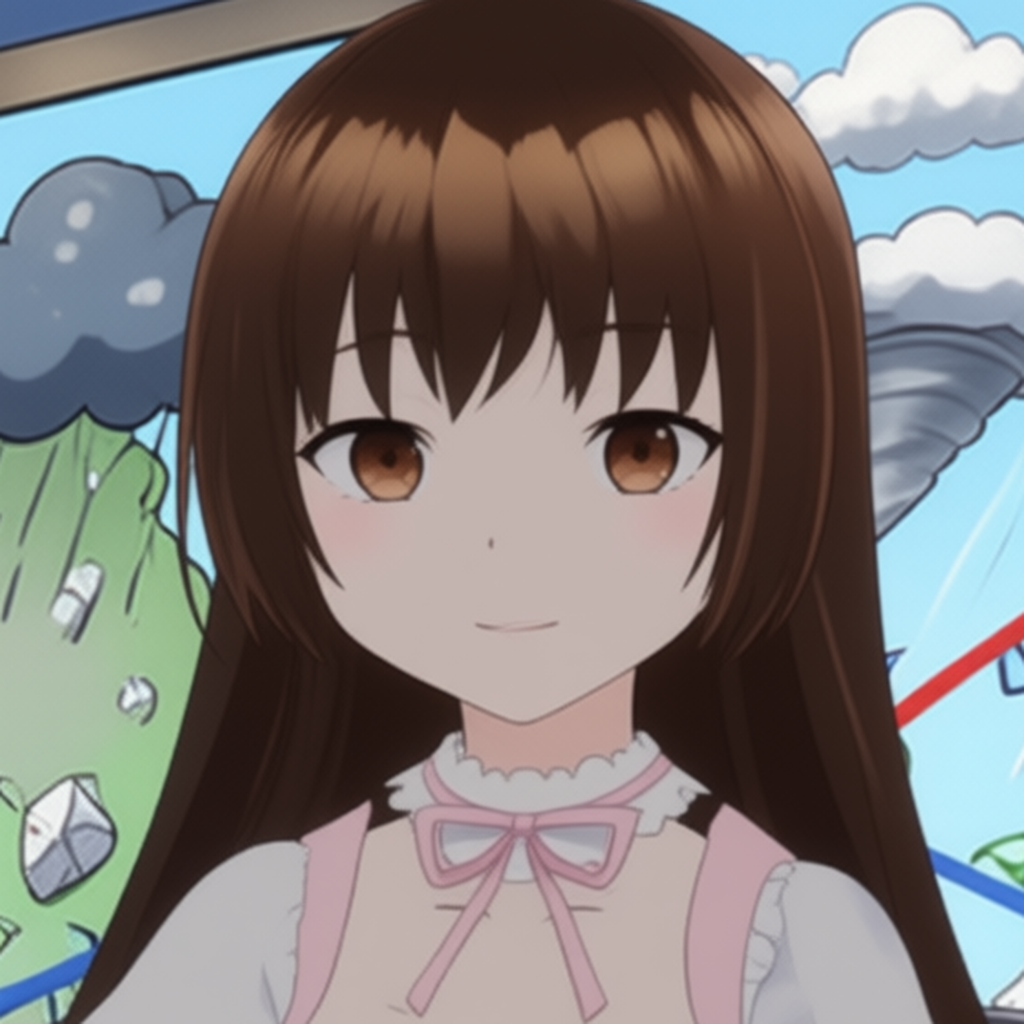
Change only her facial expression: she looks <keyword>. Keep everything else exactly the same: same girl, same face, same eyes, same hair and bangs, same clothes, same head position, same framing and background, same flat cel-shaded 2D anime style.
I did this in two phases.
- Phase 1: emotion words. 28 common words (happy, sad, angry, smug, worried, embarrassed, pensive...) plus intensity words ("just a tiny bit", "slightly", "extremely").
- Phase 2: distinctive expressions. 43 expressions with 1 to 3 different phrasings each: winks, tongue out, the closed-eye anime smile, sleeping, sweat drops, anger veins, the dark shadow over the eyes, mouth shapes for talking, and so on. Many came from my old VRoid posts.
Phase 1: the basic emotions
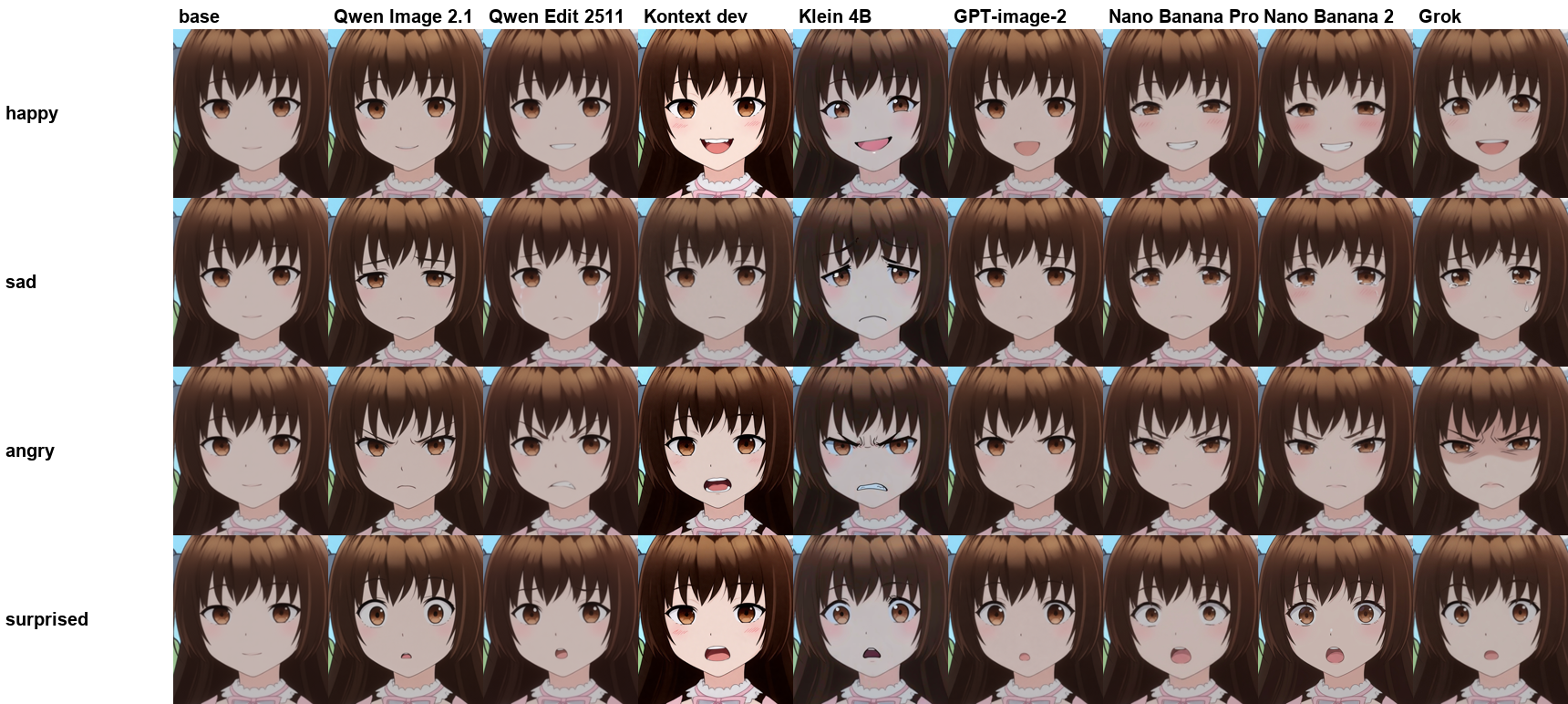
For the basics, every model did something sensible. The differences were in how well they kept the character and how far they pushed it.
Phase 1: Kontext and Klein dropped out

- FLUX.1 Kontext dev failed on the eyebrows a lot. On the strong emotions it also was less recognizable as the original character.
- FLUX.2 Klein 4B was hit and miss. It did not get all the expressions right, and many that were right did not look great. It loves gritted teeth! I would not use these.
So I dropped both of them from phase 2.
Phase 1: local vs paid

- Qwen Image 2.1 (local) was pretty good. Consistent, subtle, and good at eyebrows.
- Qwen Image Edit 2511 (local, default settings) was better than Kontext and Klein but not good enough. It goes in the right direction but only gets about 50% of the way there. Qwen Image 2.1 is clearly better. But it turned out this was my workflow, not the model. See Qwen Image Edit 2511, take two below.
- GPT-image-2 (paid) was good. Accurate and restrained. It did occasionally add things I did not ask for, such as "pensive" got a hand on the chin!
- Nano Banana Pro and Nano Banana 2 (paid) were good too. Clean edits that keep the character.
So do the paid models do better? Yes, a bit. GPT-image-2 and Nano Banana were the most reliable. But Qwen Image 2.1 was not far behind, and it runs locally for free.
Nano Banana 2 vs Nano Banana Pro: the results were close. Nano Banana Pro costs about twice as much, so I stopped running Nano Banana 2 after phase 1. The extra coverage was not worth the extra expense (aka "I am a cheapskate").
Phase 1: Grok loves anime tropes

Grok was interesting. It reaches for anime tropes: a dark gloom shadow across the eyes for angry, scared and tired, a giant blush for embarrassed, sweat drops, anger marks. Great if you want that look, too much if you want subtle.
Phase 1: which words work
Words that worked on most models: happy, sad, angry, scared, surprised, disgusted, embarrassed, shy, smug, and tired.
Words that mostly did nothing:

Pensive, wistful, relieved, deadpan, guilty, bored, skeptical, confused and determined made little or no visible difference on most models. When you think about it, these are mostly internal states. There is no single face for "pensive". What did work was describing what the face does. In an earlier test, "inner ends of her eyebrows raised and drawn together slightly, lips pressed lightly together" gave me "hidden worry" (a character who is worried but trying not to show it, so only small give-aways like the brows and lips betray it) where "worried" by itself was faint.
Some words were basically synonyms: sly, smug and proud all gave a small closed smile with lowered eyelids. Shy and embarrassed both came out as a blush.
And a couple of refusals: Nano Banana 2 would not generate "sly" at all, and Grok blocked "flirtatious".
Phase 1: intensity words

"Just a tiny bit" and "slightly" gave the same small change. "Extremely" jumped straight to full anime acting: gritted teeth, tears, gloom shadows. GPT-image-2 even added the red anger mark! So words give you roughly two levels: subtle and extreme. For anything in between you might need something else.
Phase 1: Qwen Image Edit 2511, take two
Qwen Image 2.1 has a research-only licence. Qwen Image Edit 2511 has an Apache-2.0 licence. So I really wanted 2511 to work, and went back to work out why it under-acted.
The answer was my workflow, not the model. I had built a simple workflow, and it was missing a few things the official ComfyUI template for Qwen Image Edit 2511 has:
- A FluxKontextMultiReferenceLatentMethod node set to index_timestep_zero, on both the positive and negative prompt. This changes how the reference image (Sally) is fed into the model.
- cfg 3 and 40 steps. I had cfg 1 and 30 steps.
I reran all the phase 1 prompts with these settings. In the images I call the old runs "2511 default" and the new ones "2511 fixed".

Big difference. With the official settings, Qwen Image Edit 2511 is pretty good. It is now in the same league as Qwen Image 2.1. Some expressions come out a bit differently between the two, and for some of them (with a sample size of 1!) Qwen Image 2.1 got closer to what I had in mind. But both are good. 2511 does tend to reach for tears on sad, and teeth on angry, but that is not wrong.
The intensity words were interesting too.

"Just a tiny bit" was not clearly or consistently more subtle than "slightly". But "slightly", the plain word, and "extremely" do give you different levels, more so than with Qwen Image 2.1. Look at worried and angry.
Tip: if you use Qwen Image Edit 2511, start from the official template. The full side-by-side grids for all 40 prompts are in the appendix.
An intensity dial: PixelSmile
This is where PixelSmile comes in, a LoRA for Qwen Image Edit 2511 (Apache-2.0 licence). It blends between a "neutral" prompt and a target emotion, so you get a real dial from 0 to 1. The released weights were trained on real faces, but it worked on Sally anyway.
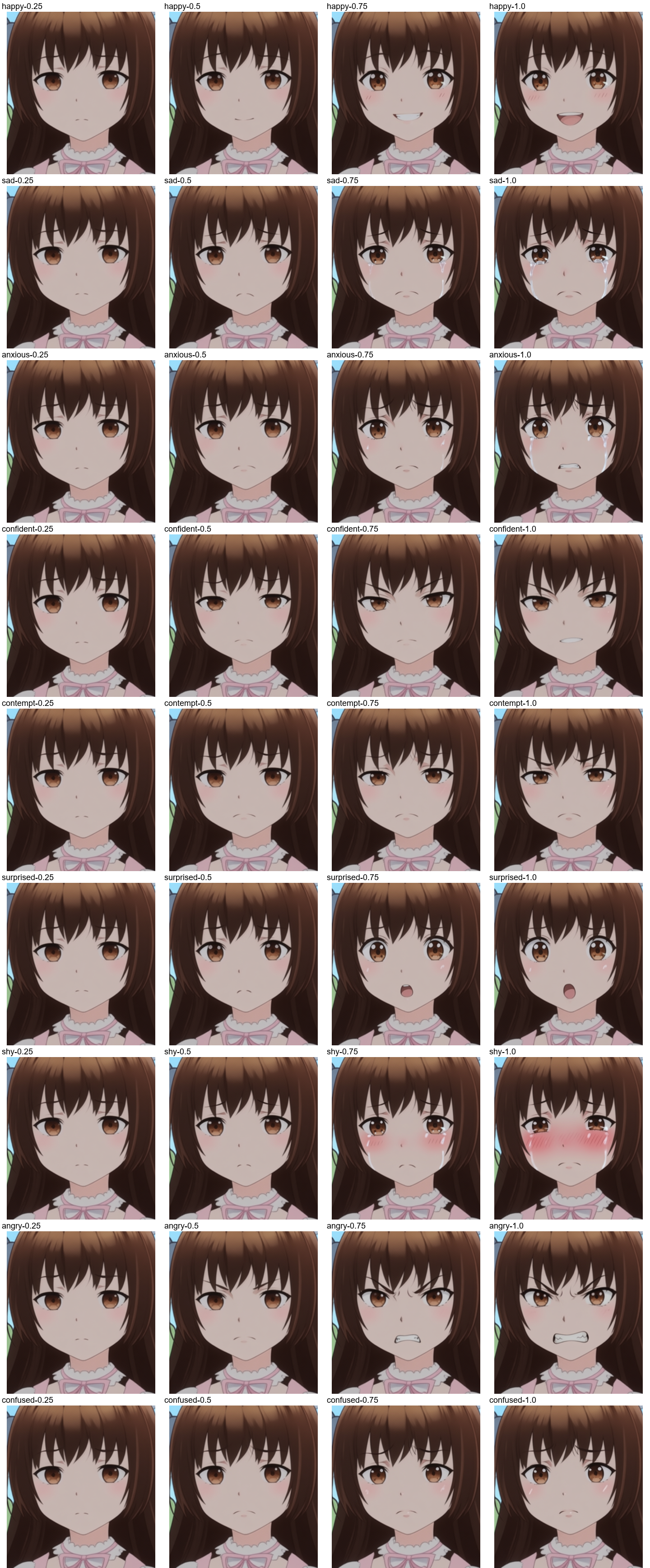
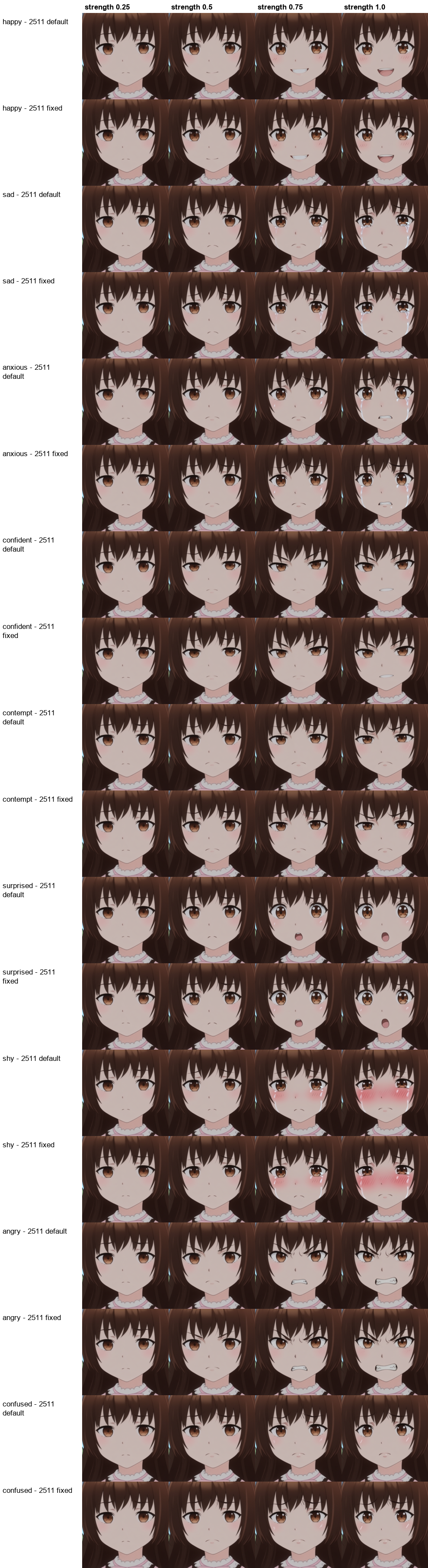
I would rate PixelSmile as very good. Not quite up with the best, but it does strengths pretty well. Around 0.5 to 0.75 is the subtle sweet spot, and 1.0 starts adding tears and heavy blushing. Some expressions were not quite there, and it only knows 12 emotions.
I also reran PixelSmile with the official Qwen Image Edit 2511 template settings. It made very little difference (see the appendix), so the settings matter for plain 2511 prompting, but PixelSmile already works fine without them.
Phase 2: distinctive expressions
Phase 2 went after the more distinctive expressions, many of them anime staples. Each expression had one to three different phrasings, so I could see which wording works best.
Anime effects work really well. Anger veins, the dark gloom shadow over the eyes, swirly dizzy eyes, heart eyes and glowing eyes all came out on basically every model. Anime conventions are clearly well represented in the training data!

Grok goes further than asked. For "dark shadow over her eyes, ominous" it added glowing red eyes and an evil grin, which is great if you are making a villain.
Closed eyes are reliable. Sleeping, and the joyful closed-eye smile, worked everywhere. "Squinting" did not: models gave me a wink or a closed-eye smile instead. "Narrows her eyes" worked much better.

Left and right winks are a coin toss. Every model can wink, but asking for the left or right eye mostly did not matter. They usually closed the same eye (on screen right) whichever side I asked for. If you need a particular eye, generate a few and pick, or flip the image afterwards.

Tears scale nicely. "Sad but not crying" stayed dry, "tearing up" and "teary-eyed" gave wet eyes or a few tears, and "tears streaming down her face" gave the full waterworks. Qwen Image Edit 2511 tended to add streams of tears even for the milder wording.

I reran the tears prompts on Qwen Image Edit 2511 with the official settings. "Sad but not crying, no tears" stayed dry, but tearing up, teary-eyed and crying all came out as full streams of tears. Qwen Image 2.1 kept the levels apart better.

Since 2511 adds tears to plain "sad" as well, I tried a few ways of asking for sad without tears:

"No tears" mostly works: it cut the tears down to one small tear or none, and "slightly sad, no tears" was completely dry. But "sad, with dry eyes" backfired with a full set of tears. Mentioning the eyes seems to put tears in the model's mind!
Embarrassment has levels too. "Faintly embarrassed with a light blush" stayed subtle, while "very embarrassed, her face bright red" went full tomato on every model. "Flustered" was in between, except on Grok and Nano Banana Pro, which added steam clouds and sweat.

Mouth shapes for talking: "ah" and "oo" work, "ee" does not. This matters if you want start frames for lip sync. "Ah" (wide open) and "oo" (rounded) were fine. "Ee" was the weird one. Qwen Image Edit 2511 (and to some extent Grok) literally wrote the letters "ee" on her face!

A few other observations from the full set (see the appendix):
- Easy wins everywhere: tongue out, grin, laughing, giggling, pout, kiss face, yawning (Qwen Image 2.1 and GPT-image-2 added a hand over the mouth), crying, sweat drop, dirt smudges.
- Shock: "shocked", "stunned" and "astonished" all looked much the same. Qwen Image 2.1 gave the biggest wide-eyed reaction.
- Half-lidded "jitome" stare: both the anime term and the plain description ("stares flatly with half-closed, unimpressed eyes") worked.
- Weak ones: "sneering" (mostly a smirk), "raises one eyebrow" and "rolls her eyes" were faint on most models, "puzzled" and "zoned out" barely changed, and the :3 cat mouth only worked on the paid models.
- Refusals: Grok's moderation blocked "makes a teasing face with her tongue out (bleh)".
What did not work: LivePortrait
I also tried the LivePortrait Expression Editor again (from my earlier post), both the sliders and copying an expression from a reference face. On this flat anime style, it barely moved the face at all. It is trained on real faces, and it showed.
Test 2: Expression reference images
Test 1 relied on words. But as we saw, some expressions are hard to put into words, and even good words give you only a couple of intensity levels. So the second idea was: what if you could show the model the expression you want instead of describing it?
The plan was to build a library of expression images (e.g., a face making each expression) and copy the expression from the library image onto my character. If it worked, one library could be reused across all my characters, and I could pick an exact face ("that one!") rather than hoping a word lands.
Building the library
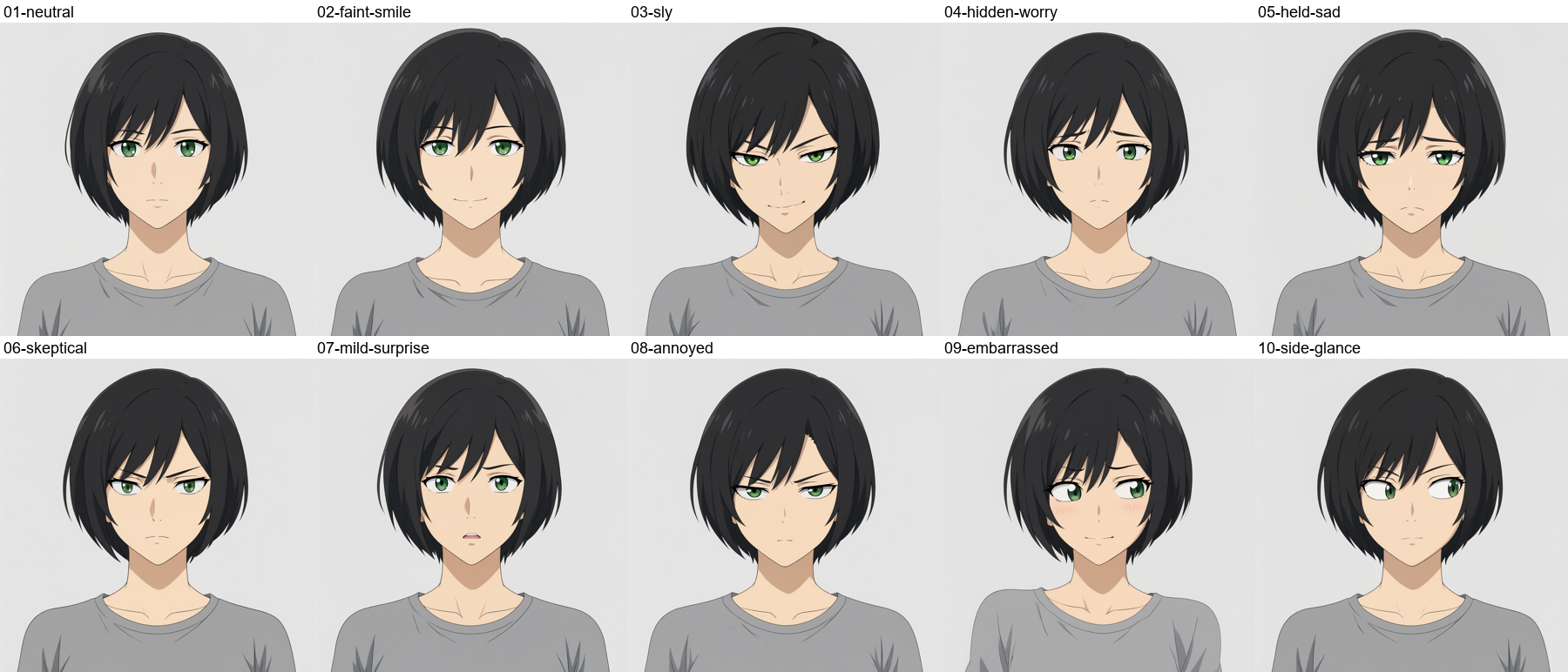
To keep it honest, I made the library on a different character, so I could see if her features leaked across. I used Qwen Image 2.1 (text to image) to draw a short-haired woman with green eyes making each of the expressions from my earlier tests: faint smile, sly, hidden worry, held-back sadness, skeptical, mild surprise, annoyed, embarrassed and a sneaky side glance.
Copying the expression
Each model got two images (image 1 was Sally, image 2 was the library face) with a prompt along the lines of:
Give the girl in image 1 exactly the same facial expression as the woman in image 2: copy the eyebrow shape, eyelids, eye direction and mouth shape. Keep the girl in image 1 completely unchanged otherwise. Do not copy the hair, face shape or clothes of the woman in image 2.
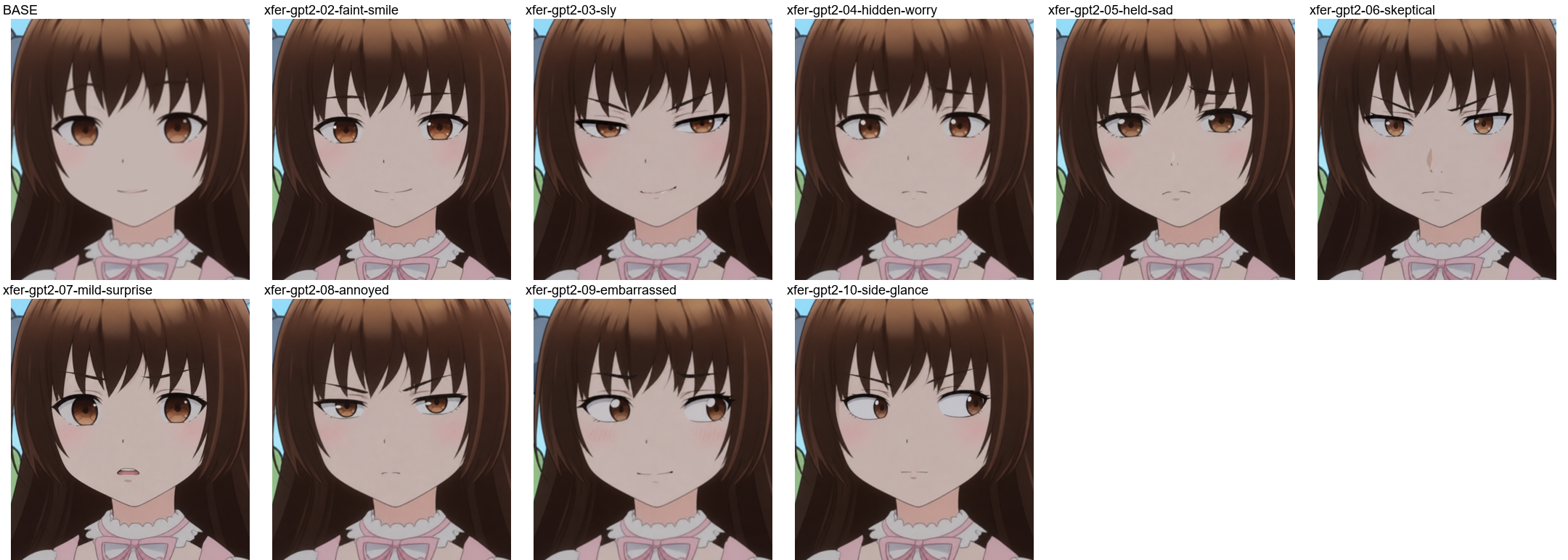
- GPT-image-2 worked, but in some cases a bit of the library character's facial structure sneaked in.
- Nano Banana Pro was not as good. The facial structure transferred a lot more in some cases.
- FLUX.2 Pro worked, but changed the skin colour.
- Qwen Image 2.1 just gave me back the library character!
Can prompting fix Qwen Image 2.1?
Since Qwen Image 2.1 is my most promising local model (licensing aside), I wanted to know if it was the model or my prompt. So I tried five different strategies on three of the expressions (sly, hidden worry, embarrassed):
- Swap the order: the library face as image 1, Sally as image 2.
- Short and direct: "Change the facial expression of the girl in image 1 to match the expression in image 2. Keep her identity."
- Show and tell: the image reference plus the expression described in words.
- Face crop: crop the library image down to just the face, so there is less of the other character to copy.
- Emphatic: "The output must be the girl from image 1... image 2 is ONLY a reference for the facial expression."
I also tried two of them on Qwen Image Edit 2511 for comparison.
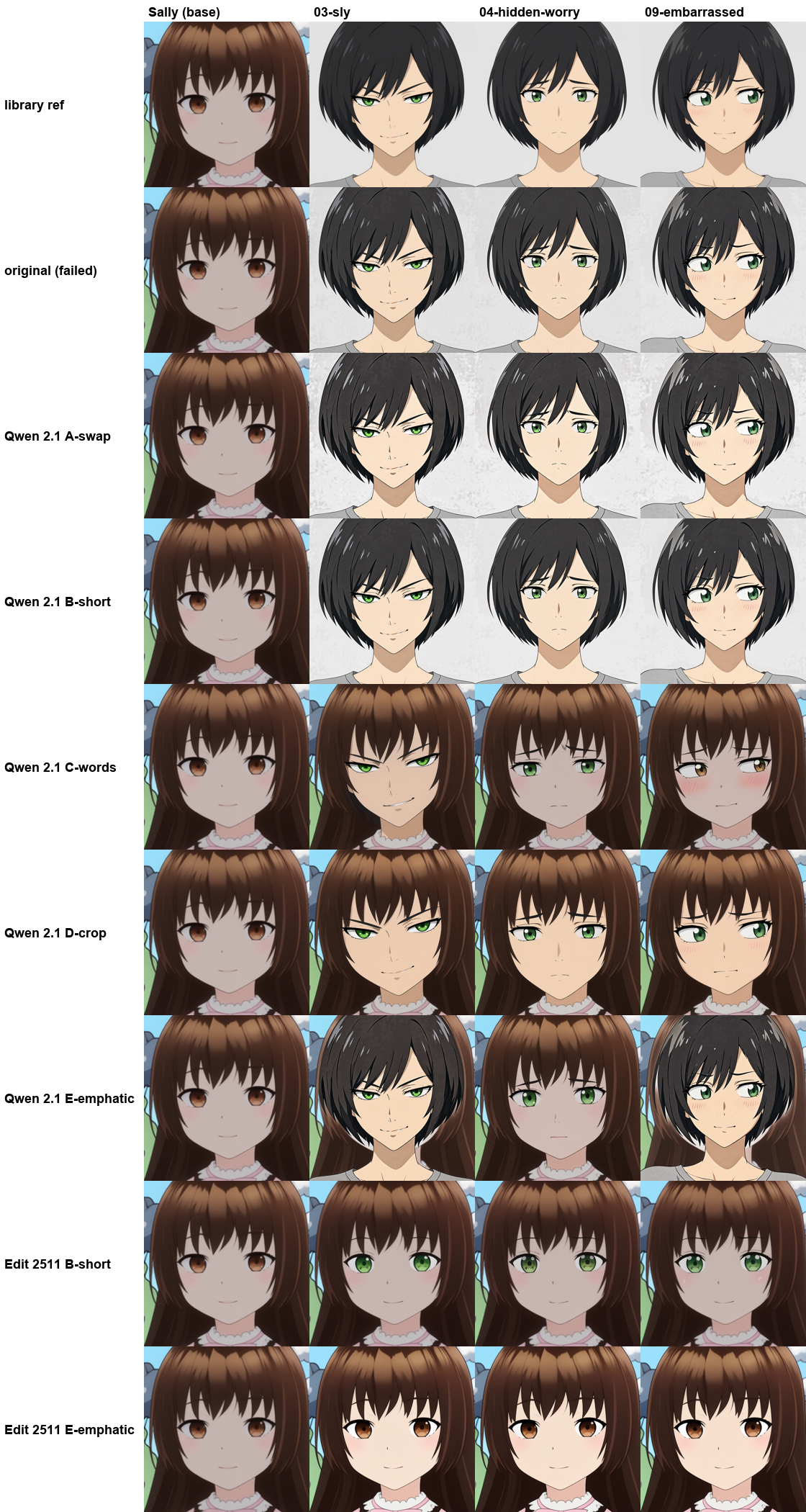
- Swapping the order, short and direct, and emphatic mostly still gave me the library character.
- Show and tell, and the face crop, kept Sally (but her eyes turned green, the library character's eye colour) and some of the other face's structure crept in.
- Qwen Image Edit 2511 kept Sally, but barely copied the expression.
That green-eye leak gave me an idea: crop the reference to just the face and make it greyscale. With no colour to copy, Sally kept her brown eyes and skin tone, and picked up the expression. (See last row below.)
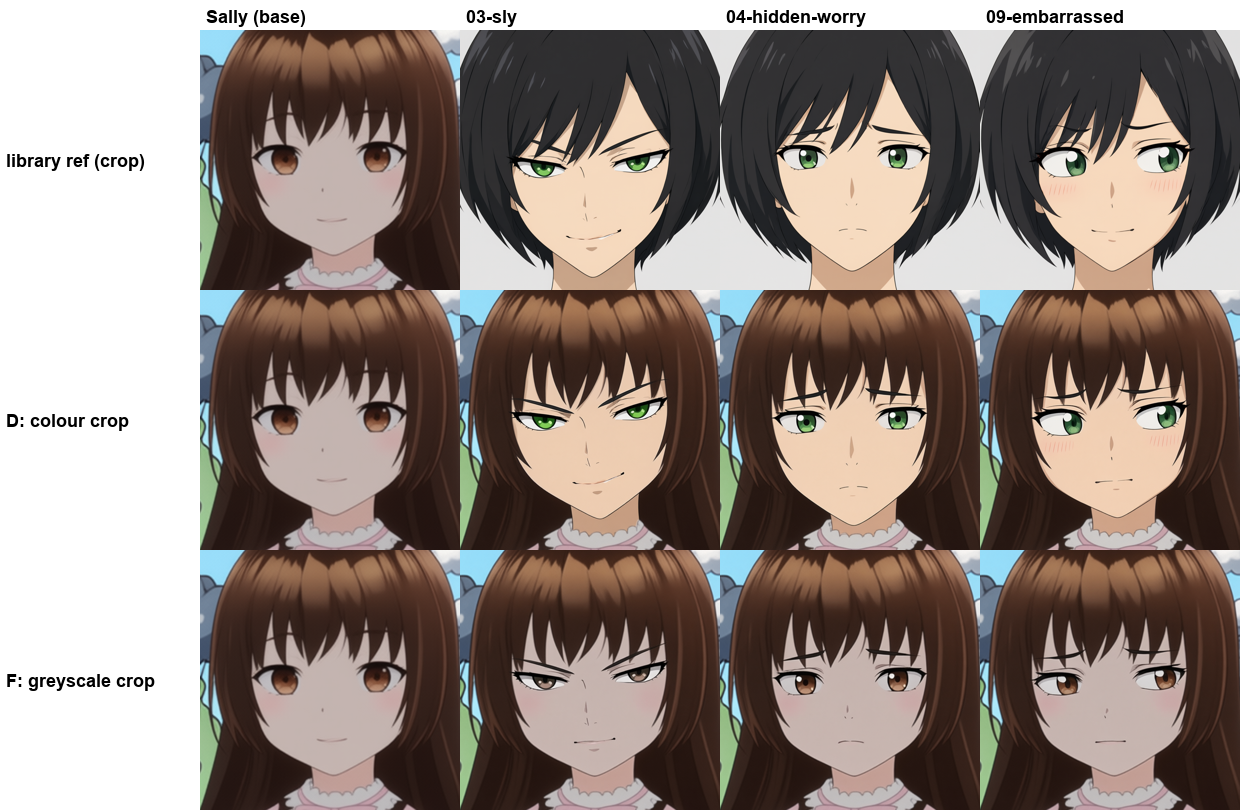
So the prompt was part of the problem, but the bigger one was the reference image leaking identity (eye colour, nose, skin tone). A greyscale face crop makes an expression library usable with a local model. But none of the results were great.
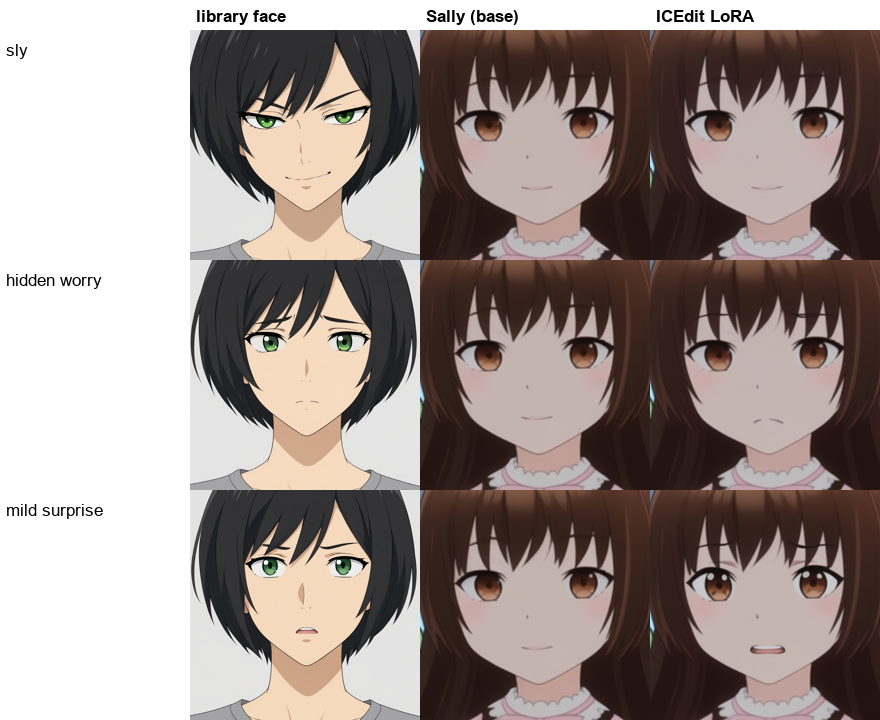
I also tried an "in-context edit" LoRA for Qwen Image Edit 2511 (ICEdit, from DiffSynth). Instead of one reference image, you give it an example change (the library face neutral, then the library face with the expression) and ask it to make the same change to Sally. It kept Sally perfectly, but the expression barely came across, even with the official template settings. See the appendix.
I also tried giving MiniMax H3 an expression image as a reference while generating a video (more below).
Test 3: Do it all in the video model (MiniMax H3)
Finally, what if you skip the image step and do everything in the video model? I used MiniMax H3.
Reference sheet plus a prompt. H3 has a "reference-to-video" mode: instead of a start frame, you give it up to nine reference images (called Picture 1, Picture 2 and so on in the prompt) and it generates a shot that features them. I gave it Sally's full-body character sheet as Picture 1, and described the scene (a TV weather presenter in front of a weather map), the expression, and how the expression should change during the 5 second shot.
For the last two tests I also gave it an expression still as Picture 2, a close-up of Sally already making the expression, made with Qwen Image 2.1 in Test 1.
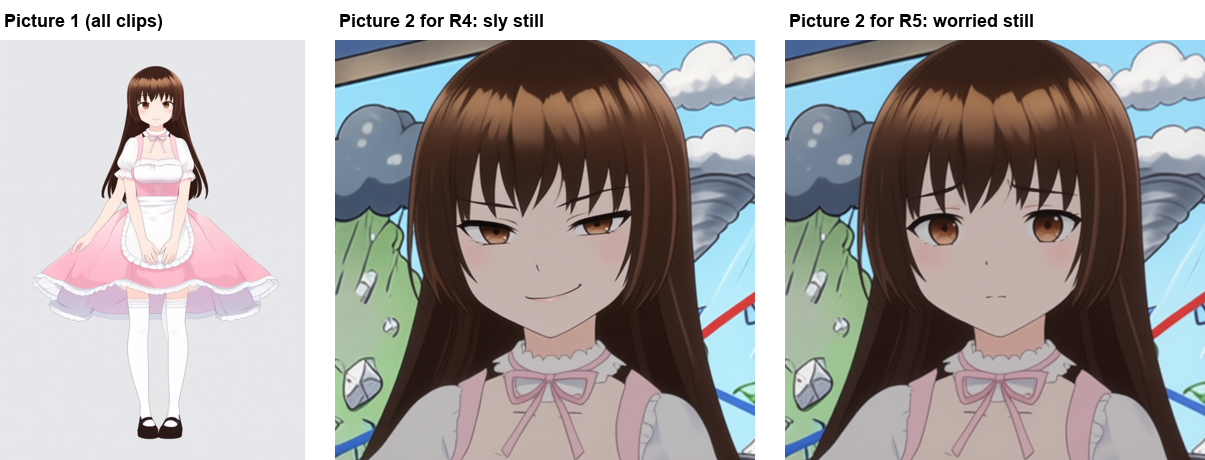
| Clip | Picture 1 | Picture 2 | What the prompt asked for |
|---|---|---|---|
| R1 sheet-morph-sly | character sheet | - | start neutral, then a small sly smirk slowly forms |
| R2 sheet-hold-worry | character sheet | - | hidden worry for the whole shot |
| R3 sheet-morph-worry | character sheet | - | start pleasant, then slowly change to hidden worry |
| R4 sheet+expr-sly | character sheet | sly still | hold the expression shown in Picture 2 |
| R5 sheet+expr-morph-to-worry | character sheet | worried still | start calm, then change until the face matches Picture 2 |
Each was run with two random seeds (s101, s202), giving the 10 clips below.

You will notice the first six clips look quite different from the last four:
- R1-R3 (sheet only) are lighter, with a weather map H3 invented. The sheet has a plain grey background, so H3 had to make up the studio from the prompt, and the lighting with it.
- R4-R5 (sheet plus expression still) are darker and use my actual weather map background. That is because the expression stills were cut from the real shot, so they brought its background, framing and darker colours with them. H3 copied the whole picture, not just the face.
As for the expressions: prompt words alone (R1-R3) were the weak point. The face kept drifting back to a pleasant smile, and the worry in R2 and R3 barely showed. Adding the expression still (R4-R5) made a big difference: R4 held the sly look, and R5 really did morph into the worried face. Overall not as good as the other approaches for me, but pretty good for doing it all in the video model.
Starter images with H3. For comparison, I also tried the starter-image approach from Test 1 with H3's image-to-video mode, where the image is the video (not just a reference). H3 can take a first frame, or a first frame and a last frame and fill in the motion between them.
The inputs were the neutral shot of Sally from the finished skit, plus full-frame expression stills of the same shot made with Qwen Image 2.1:
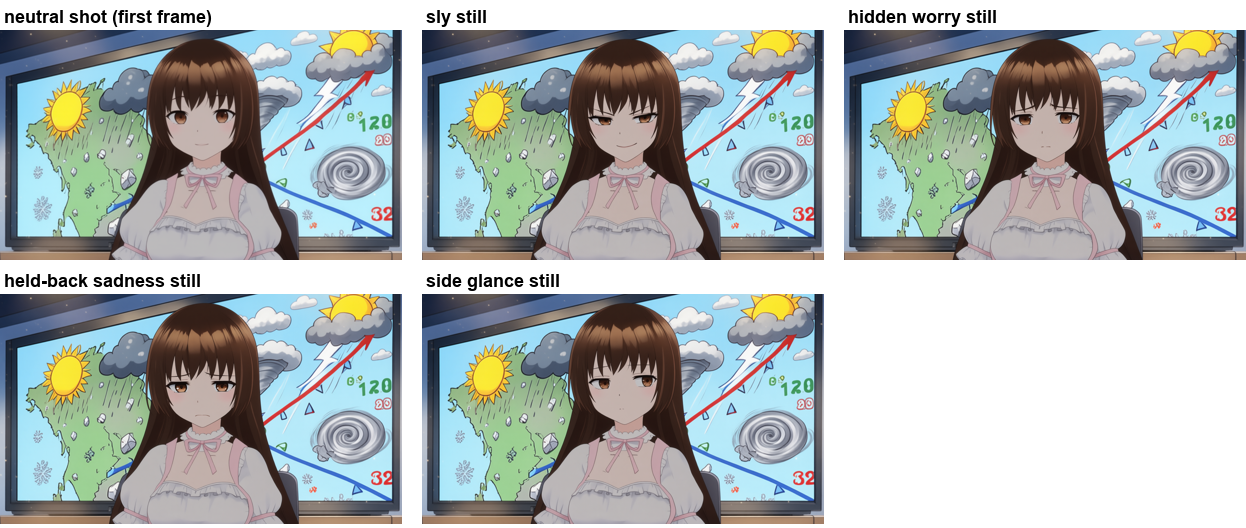
The clip names in the montage describe the setup:
| Clip | First frame | Last frame | What the prompt asked for |
|---|---|---|---|
| A neutral-prompt-sly | neutral shot | - | prompt only: a small sly smirk slowly forms |
| A2 neutral-prompt-worry | neutral shot | - | prompt only: she becomes quietly worried |
| B start-sly / start-worry / start-sad | the expression still | - | hold the expression already in the frame, with small movements |
| C fl-neutral-to-sly / fl-neutral-to-sideglance | neutral shot | the expression still | change from neutral to the expression ("fl" = first + last frame) |
| D ...-silent (s7, s8) | as B or C | as B or C | the same, plus "she stays silent" |
What is "silent" about? H3 generates sound as well as video, and it kept deciding Sally should say something (her mouth would open mid-clip as if talking or laughing). So the D clips add to the prompt: "She stays completely silent: her mouth stays closed the whole time, she does not speak, laugh or open her mouth. No dialogue." The s7 and s8 suffixes are two different random seeds.

Not every expression landed, but the morphing was good and the colours were right in every clip. Because the frames came from the real shot, there was nothing for H3 to reinvent. The prompt-only clips (A) were weakest, the same as in reference-to-video. And "silent" reduced the mouth opening, but did not stop it every time.
A second round, comparing the two head to head. I then made full-shot expression stills for five expressions with Qwen Image 2.1 (sly, hidden worry, held-back sadness, mild surprise, annoyed):

and fed each to H3 two ways:
| Clip | Mode | Inputs |
|---|---|---|
| E1 fl-<expression>-s7 / s8 | first + last frame | neutral shot as the first frame, the expression still as the last frame, "silent" prompt, two seeds |
| E2 r2v-<expression> | reference-to-video | the actual shot as Picture 1 (to keep the background this time), the expression still as Picture 2 |

The two behaved in opposite ways:
- First + last frame (E1) tended to hold the first expression for most of the shot (often talking), then change to the final expression right at the end.
- Reference-to-video (E2) did the opposite: it adopted the target expression early, then talked.
Using the shot as a reference did fix the reinvented background. But in both cases the character still wanted to talk, even with "silent" in the prompt. So pick the approach by when you want the expression to show up: first + last frame for a reaction that lands at the end of the shot, reference-to-video for an expression held through the shot.
Describing the face instead of naming it. So far my H3 prompts only named the expression ("her expression slowly changes to hidden worry"). But in Test 1, describing what the face does worked much better than naming an emotion. So I tried the same with H3, with no expression image at all. For example, for hidden worry: "she becomes quietly worried but trying to hide it: the inner ends of her eyebrows raised and drawn together slightly, lips pressed lightly together."
| Clip | Mode | Inputs |
|---|---|---|
| F1 i2v-face-<expression>-s7 / s8 | image-to-video | the neutral shot as the first frame only (no last frame), face described in the prompt, "silent", two seeds |
| F2 r2v-face-<expression> | reference-to-video | the shot as Picture 1 only (no expression still), face described in the prompt |
In the montage, each row is one expression, and the columns are E1 (first + last frame with the still), F1 (two seeds), E2 (reference-to-video with the still) and F2.

To me it looks like describing the face closes most of the gap. Sly, hidden worry, held-back sadness and annoyed all seemed to land from the text alone, in both modes. The clips that had an expression still look a little stronger to me, mostly in the eyebrows, and mild surprise was the weakest with text only (one seed and the reference-to-video clip barely moved). The timing and talking behaviour was the same as before.

So my earlier "H3 drifts back to a pleasant smile" result seems to have been at least partly my prompt. Naming the emotion was not enough; describing the face got much closer.
So what would I use?
The big question I came out of this with: do you need starter images at all? Making a still for every shot is extra work. Could you just give the video model the character (a plain reference image, like a character sheet) and some text, and let it do its job?
For a lot of shots, I think yes. Video models are getting good, and if the expression is obvious (happy, laughing, talking) or the character is speaking anyway, a reference image plus a prompt may be all you need. That is a shortcut, and shortcuts are about speed. Speed does matter. My time is limited!
Starter images are about control:
- Storyboarding. You can see and fix every shot as a still before you spend time generating video. Storyboarding also helps with consistency across shots (color, tone, etc). And storyboarding gives you more choice of the image to video model to use afterwards.
- Scene composition. Where the characters stand, how big they are, what the camera sees. This is much easier to get right in a still image than to describe in text. (Remember Julie and Sally at different scales in my opening shot.)
- Touch-ups. You can fix the lighting, colours and small details in the still before the video model sees it.
- Consistency across shots. The same still can be the starting point for different shots, or different video models, which hopefully keeps them consistent. (With only a character sheet, H3 invented its own background and lighting. Frames taken from the real shot kept the colours right.)
- Subtle expressions (a little). When I only named the expression, H3 drifted back to a pleasant smile. Describing the face in the prompt got most of the way there, but the clips with an expression image still looked a bit stronger to me. So images seem to give a little more control here, not a lot.
- When the reaction happens. First and last frames let you decide the expression at the end of the shot.
But control only helps if you actually have it. Generating lots of bogus videos because you could not control the result is not fast either. That is why I think my next experiment will be with pose control and scene composition: getting characters posed, at the right size, with the right expression, in the right place in the scene. A topic for a future post.
When I do want starter images:
- Qwen Image Edit 2511 with the official template settings locally. It is pretty good, and it has a licence I can use. Qwen Image 2.1 is just as good (sometimes closer to what I had in mind), but it is research-only. GPT-image-2 or Nano Banana Pro when it really matters. Basic emotion words work, "slightly" and "extremely" change the level, and describe the face for subtle or internal states.
- PixelSmile when I want a specific strength of a basic emotion.
- MiniMax H3 first and last frame to animate between them, with "silent, mouth closed" in the prompt unless the character is speaking.
Appendix: all the images
Every image from these tests is available. The grids below show every model side by side for every prompt. Click a grid to open it full screen, then click again to zoom in to full size.
Phase 1 (emotion words) - overview grids:


Phase 1 - Qwen Image Edit 2511 default vs official template settings ("2511 fixed"), with Qwen Image 2.1:


Phase 1: every image
Each row is one prompt ("she looks ..."), one image per model. Click any image to see it full size.
happy


sad


angry


scared


surprised


disgusted


smug


sly


mischievous


worried


nervous


embarrassed


shy


guilty


skeptical


suspicious


confused


bored


tired


annoyed


pensive


wistful


determined


relieved


proud


deadpan


flirtatious


contemptuous


just a tiny bit smug


slightly smug


extremely smug


just a tiny bit worried


slightly worried


extremely worried


just a tiny bit sad


slightly sad


extremely sad


just a tiny bit angry


slightly angry


extremely angry


Phase 2 (distinctive expressions) - overview grids:


Phase 2: every image
Each row is one phrasing ("she ..."), one image per model. Click any image to see it full size.
is asleep with her eyes closed


is sleeping peacefully


has closed eyes, sleeping


smiles happily with her eyes closed


has a ^_^ anime smile: eyes closed and curved upward like arches, cheeks raised


beams with joy, eyes squeezed shut into happy upward curves


looks content, eyes half closed, gentle smile


looks peaceful and relaxed


looks sorrowful


looks grief-stricken


looks shocked


looks stunned


gasps in shock, eyes wide, mouth open


looks astonished


has a big toothy grin


grins widely showing her teeth


is gloating


is sneering


sneers, one side of her upper lip raised


is squinting


narrows her eyes


gives a half-lidded unimpressed stare (jitome)


stares flatly with half-closed, unimpressed eyes


winks her left eye


winks: her left eye closed, her right eye open


winks her right eye


winks: her right eye closed, her left eye open


sticks her tongue out playfully


makes a teasing face with her tongue out (bleh)


is lovestruck with heart-shaped eyes


looks in love: dreamy gaze, soft smile, blushing


puckers her lips to blow a kiss


makes a kissy face


is faintly embarrassed with a light blush


is very embarrassed, her face bright red


is flustered


looks puzzled


looks confused: one eyebrow raised, the other lowered


looks sneaky, plotting something


is scheming with a sly grin


looks devious


looks terrified


looks frightened


snarls furiously, teeth bared


looks enraged


is pouting


pouts with puffed-out cheeks


is crying with tears streaming down her face


is teary-eyed, about to cry


is tearing up


is laughing out loud


is giggling


smiles awkwardly with an anime sweat drop


looks sheepish


has a blank, expressionless stare


looks zoned out


looks grossed out


is smirking


raises one eyebrow


rolls her eyes


is yawning


has a cat-like :3 smile


is dizzy with swirly anime eyes


is angry with an anime anger vein (red cross-shaped mark) on her forehead


is gloomy: the upper half of her face is in dark shadow with vertical gloom lines


has a dark shadow over her eyes, ominous


blushes deeply, a red flush rising up her face from her cheeks


is nervous with a bead of sweat on her cheek


has glowing yellow eyes


has dirt smudges on her face


is sad but not crying, no tears


has her mouth wide open as if saying 'ah'


has her lips rounded as if saying 'oo'


has her lips stretched as if saying 'ee'


PixelSmile: default vs official settings
The same PixelSmile runs with my original workflow ("2511 default") and with the official template's reference method node and 40 steps ("2511 fixed"). PixelSmile runs without CFG, so cfg stayed at 1. Click to zoom in.
ICEdit LoRA
ICEdit LoRA on Qwen Image Edit 2511 with the official template settings. Image 1 was the library face neutral, image 2 the library face with the expression, image 3 Sally. Sly did not transfer at all, hidden worry only changed the mouth a little, and mild surprise opened the mouth but did not raise the eyebrows.
H3: face described in the prompt
Every clip from the face-description test, next to the round 2 clips that used an expression still. Each row is one expression: E1 (first + last frame with the still), F1 (face described, two seeds), E2 (reference-to-video with the still) and F2 (reference-to-video, face described). Click a clip to see it larger.
Sly


Hidden worry


Held-back sadness


Mild surprise


Annoyed


The full resolution images, plus the scripts I used and a README describing every folder, are in the blog's
media storage under media/anime-expression-keywords/ (organised by phase and model, e.g.
phase1-emotion-words/gpt-image-2/happy.png) and media/subtle-anime-expressions/ (LivePortrait,
PixelSmile, expression library and H3 clips).